| |
|
Hello wonderful people :) I'm having a hard time wrapping my head around the uploading, even after reading guides and other users posts here on the help section. Somewhere I read that i should start with all my images small, and then resize it even smaller. I do see people uploading high quality images here in the forum, so how do you guys resize it without making it horribly pixely? I tried following the guides, blurring/sharpen, saving for web. Am i missing something or maybe reading outdated guides? Also need help with understanding how to make all the cuts? As I am completely new to that. Kinda been stuck on this for a good while and frustratingly haven't been able to figure it out, so would be really grateful for some help <3 If someone is willing to mentor me through this whole confusing debacle, I would be willing to make them a piece as a gift as I am imagining this is alot I'm asking of someone ^^ <3 Also since I am making a post, might aswell get your opinion on my Tier rank? :) Edit: It also seems the text is broken??? It refuses to register that i press enter??? Heeeelp >_____<" |
|
|
| |
Art Team
|
I would be more than happy to help!! I'd say start high Tier 2. Especially that second piece is gorgeous and I would love to purchase it immediately if available 😂 So for uploading in the forums, you can upload it as a full image. It can be full quality without needing to resize it whatsoever. Uploading as stable sets and horse avatars is trickier, horse avatars especially. Making cuts from your image, try to work on ratios then resize. So the stable avatar size requirement is 300x300 pixels. This means that you can make your inage any size of square and resize it down to 300x300. The issue is, if you go from 1000x1000 down to 300x300, you're going to lose a lot of quality. That part is unavoidable but I have known people to use their phone's photo editing features to sharpen the image if it becomes too blurry. I like this website to resize images because it's pretty simple to use. https://www.easyimageresize.comAlso the text isn't broken, it just doesn't like for you to have empty lines . I like to use a period fo break up text. I'm more than happy to answer any more questions you may have! |
|  |
|
| |
|
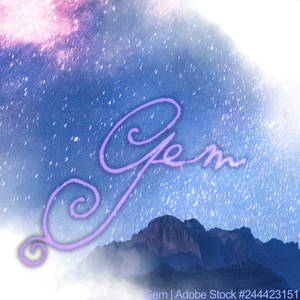
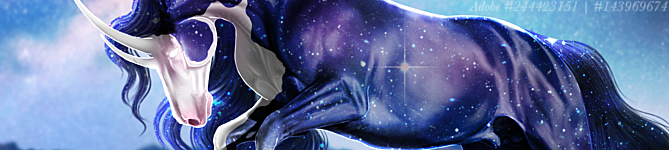
Thank you so much for helping :D <3 And haha given your name I would think it's fate! High Tier 2, that is such a compliment thank you, even more that you are willing to purchase the image <3 I have no idea on pricing, so I shall have read more of the guides for that :) . And thanks for the period trick! What about stable sets? Is it the stable banner or...? Like what is a "stable set"? . I have to ask more about the resizing, just to make sure I'm not missing something. Please bear with me ':D So if I where to take that gem horse image, fix it into a square ratio -> resize it small -> Then go back to photoshop, to put on credits and sharpen? -> upload again? What would then be the recommended size I start out with on photoshop? I am used to working on big canvases. I will do some testing and hopefully I will figure this out this time :) . Also if anybody else has anything else to add, feel free because I need all the help I can get :D |
|
|
| |

|
For resizing, I make another canvas and put the completely downloaded image into it, and essentially crop it with the dimensions of the cut. I work on big canvases too 😉. Then, sometimes, I have to go to an image compressor and shrink the file size a bit, but not dimensions, becuase those have already been done. :D . If you've got anymore questions, just shoot me a pm! |
|  |
|
| |
Art Team
|
Haha, thanks! . A stable set is the combination of stable avatar plus stable banner. It just refers to both of the images :) . I typically put credits on before resizing but I'm not sure it entirely matters. But yeah! That's the jist of it <3 I have the same issue 😅 My canvases are always huge then the quality gets demolished when I resize them. I'd try to stay within 1500px or so max. Smaller if possible. The exact values typically depend on the size of the background image . |
| |
|
| |
|
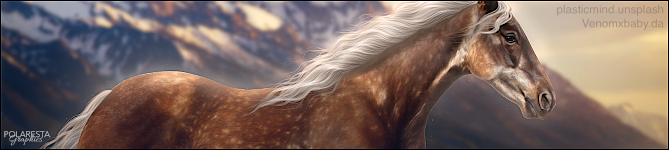
Thank you Tranquility! I will send you a PM just for some minor clarifications ^^ . Ah! That explains it, I was wondering what it meant. Hehe seems like a common issue, but if that is just how it is, I'll stop complaining ^^ I just knew that there had to be a better way to get quality, because what I was getting was very bad D: . . Ok I followed your guide and what do we think? Is there something I could improve? It's already better than what i was getting, so there's that :P I do not understand how someone is supposed to read the credits though :S |
|
|
| |
Art Team
|
Yeah, that looks great! Credits though, you can either make them bigger before resizing (what I typically do) or add them after resizing |
| |
|
| |
|
Ok what a relief, I have been struggling with this D; I think also the link you gave me was better than whatever website I was using. . I also looked at the pricing guide, and realized that I can manipulate images all the way up to Tier 3, but those two examples were maybe not the best to show that off... I do have a dragon manip that would be better for that, although I have to refind some of the stock links before I could post that one. I guess I have to get to work and make more to prove my worth :') At least this is giving me lots of motivation now, instead of frustration, I owe it all to you guys :D <3 |
|
|

 Crisp, Clear, and Cool


