Horse Eden Eventing Game


Year: 200   Season: Fall   
$: 0
Forecast: Morning Drizzle, but Clearing later
Forecast:
Mon 07:34pm  
Stables Online:  132 
Chatbox
fire
07:34:01 
how
and how do you put mpney in a savings acout
Jericho Stables
07:33:00 
Fire, you can make a forum thread.
fire
07:30:44 
how do you make a chat for a club
Equity Falls
07:24:03 Dimmed | KNN
-HEE Click-
Whaaat she was only 20 :(
Jericho Stables
07:23:37 
I'll my messages look fine
Enceladus
07:22:32 Sun's KNN's
-HEE Click-
That’s nice!
Dash Warmbloods
07:15:48 
“ style='cursor: pointer;'3/11” it says on the subject line lol
Dash Warmbloods
07:14:56 
Anyone’s messages all messed up?
The Undercity
07:05:39 Dory
I wish he would have produced a bit better than he did but he did produce 2 WWWs
-HEE Click-
Mythological
07:03:34 Tim:2016-2026
I really don't want to be training a mule next year.
Aura Show Horses
07:02:18 Aura /Pea
Em
She is so cute!
Aura Show Horses
07:01:57 Aura /Pea
Lol
Sounds cool!
Glacier Bay Cove
07:01:30 Glacier Kittens
Maybe
Insignia Elites
07:01:21 Em
Wish she was all up but I will take it -HEE Click-
Mythological
07:01:05 Tim:2016-2026
Would RIP-Tim-2016-26 fit I wonder...
Glacier Bay Cove
07:01:00 Glacier Kittens
What will your new nickname be, Myth
Aura Show Horses
06:58:22 Aura /Pea
Ok!😂
Mythological
06:57:42 Tim:2016-2026
I need to redo my nickname.
Aura Show Horses
06:56:52 Aura /Pea
Tim
LOL
Jericho Stables
06:56:49 
SouthernScorpion, selling a horse needs to go in the sales chat or forum

You must be a registered member for more
than 1 day before you can use our chatbox.


Rules   Hide
You are in: Main Chat
View Sales Chat
Quests

Embark on a Quest.

Horse Eden Eventing Game
Chatbox
fire
07:34:01 
how
and how do you put mpney in a savings acout
Jericho Stables
07:33:00 
Fire, you can make a forum thread.
fire
07:30:44 
how do you make a chat for a club
Equity Falls
07:24:03 Dimmed | KNN
-HEE Click-
Whaaat she was only 20 :(
Jericho Stables
07:23:37 
I'll my messages look fine
Enceladus
07:22:32 Sun's KNN's
-HEE Click-
That’s nice!
Dash Warmbloods
07:15:48 
“ style='cursor: pointer;'3/11” it says on the subject line lol
Dash Warmbloods
07:14:56 
Anyone’s messages all messed up?
The Undercity
07:05:39 Dory
I wish he would have produced a bit better than he did but he did produce 2 WWWs
-HEE Click-
Mythological
07:03:34 Tim:2016-2026
I really don't want to be training a mule next year.
Aura Show Horses
07:02:18 Aura /Pea
Em
She is so cute!
Aura Show Horses
07:01:57 Aura /Pea
Lol
Sounds cool!
Glacier Bay Cove
07:01:30 Glacier Kittens
Maybe
Insignia Elites
07:01:21 Em
Wish she was all up but I will take it -HEE Click-
Mythological
07:01:05 Tim:2016-2026
Would RIP-Tim-2016-26 fit I wonder...
Glacier Bay Cove
07:01:00 Glacier Kittens
What will your new nickname be, Myth
Aura Show Horses
06:58:22 Aura /Pea
Ok!😂
Mythological
06:57:42 Tim:2016-2026
I need to redo my nickname.
Aura Show Horses
06:56:52 Aura /Pea
Tim
LOL
Jericho Stables
06:56:49 
SouthernScorpion, selling a horse needs to go in the sales chat or forum

You must be a registered member for more
than 1 day before you can use our chatbox.


Refresh


Forums

→ Horse Eden is a fun game! Sign Up Now!

My Subscriptions
My Bookmarks
My Topics
Latest Topics
Following

Forums > Art Shops > Art Help
   1 

Photoshop Help November 2, 2020 04:38 PM


Skye's Paradise
 
Posts: 2738
#803360
Give Award
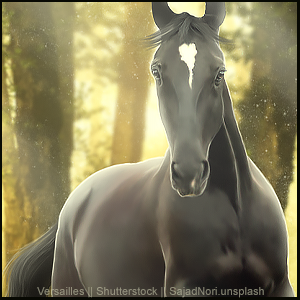
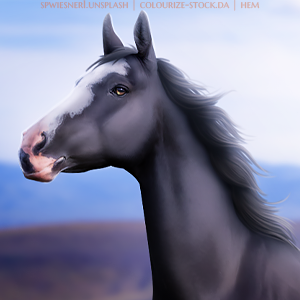
I'd absolutely love to know how you guys get your art to have a "soft" look overall.
For example:
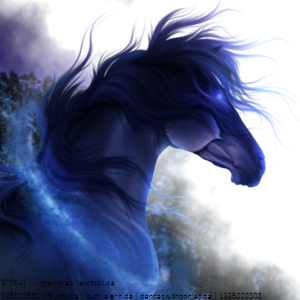
compared to crisp art, like this:
Oh please give me your secret! :)
Thanks!!!
Photoshop Help November 2, 2020 05:33 PM


White Oak Manor
 
Posts: 3494
#803377
Give Award
So disclaimer here, I don't use PS.
However, the same concept applies to any art program. The process is pretty simple. Just duplicate your horse stock layer and smudge the top one with a low opacity brush. That will give you the smooth plastic looking appearance. :)
Photoshop Help November 3, 2020 10:27 AM


Merryland Farm
 
Posts: 1340
#803668
Give Award
In photoshop, I duplicate the layer and create a clipping mask with the second layer (keeps the edges neat). I then use the mixing brush tool on the moist setting and no brush load to soften the top layer. After that, I reduce the opacity of the top layer to somewhere between 50 and 70% and merge the layers
I also do a step of making a blank layer with clipping mask and painting over the highlights with white. I put that layer on the soft light setting and fiddle with the opacity until it looks right.
Photoshop Help November 28, 2020 12:16 PM


Golden Hall Stables
 
Posts: 840
#813950
Give Award
Another tool in PS that you can play around with is under the filters and is the remove noise filter. It may help give you a more smooth appearance.
Photoshop Help November 28, 2020 12:19 PM


HRS
 
Posts: 3603
#813953
Give Award
I first reduce the noise on the horse layer, then use the smudge tool in PS with the intensity of 10% to get an even smoother look. But this has to be done carefully not to smudge out the details with muscle lines.
Photoshop Help November 28, 2020 03:13 PM


Skye's Paradise
 
Posts: 2738
#814012
Give Award
Thank you so much! I never knew about the noise filter! Hugs!!!
Photoshop Help November 28, 2020 10:59 PM


Jericho Stables

Moderator
 
Posts: 3485
#814145
Give Award
Once I complete the image I merge together all the layers, duplicate the one layer. Then on that top layer do a "Gaussian blur" and then set that layer to soft light and then reduce the opacity to where it looks good

Forums > Art Shops > Art Help
   1 

Refresh