Horse Eden Eventing Game


Year: 200   Season: Fall   
$: 0
Forecast: Crisp, Clear, and Cool
Forecast:
Sun 01:31am  
Stables Online:  57 
Chatbox
fire
01:31:22 
issy
fire
01:24:42 
how do you know you created it
fire
01:23:35 
i dont no where the url is
Nightingales Ridge
01:22:04 𔓘 Issy
You're saying you created it but it won't appear when searched ?
Nightingales Ridge
01:21:13 𔓘 Issy
Copy and paste the url
fire
01:20:09 
? how
Nightingales Ridge
01:19:55 𔓘 Issy
Can you link it
fire
01:18:45 
do know why its not showing
Nightingales Ridge
01:17:11 𔓘 Issy
Rude he threw you those ratings
fire
01:16:43 
KHA
Nightingales Ridge
01:16:41 𔓘 Issy
Bingus how beautiful!
Nightingales Ridge
01:15:46 𔓘 Issy
What did you name it
fire
01:15:00 
and fun times for newbies
Winterfall
01:14:44 →Winter
also thanks Issy!
Winterfall
01:14:32 →Winter
Bingus, that horse looks so pretty!! I love its colors
Nightingales Ridge
01:14:27 𔓘 Issy
Oh
Nightingales Ridge
01:14:24 𔓘 Issy
Fire what's your club for
fire
01:14:11 
breeding
Nightingales Ridge
01:14:05 𔓘 Issy
Winter it is premium
Nightingales Ridge
01:13:47 𔓘 Issy
What's the club for??

You must be a registered member for more
than 1 day before you can use our chatbox.


Rules   Hide
You are in: Main Chat
View Sales Chat
Quests

Embark on a Quest.

Horse Eden Eventing Game
Chatbox
fire
01:31:22 
issy
fire
01:24:42 
how do you know you created it
fire
01:23:35 
i dont no where the url is
Nightingales Ridge
01:22:04 𔓘 Issy
You're saying you created it but it won't appear when searched ?
Nightingales Ridge
01:21:13 𔓘 Issy
Copy and paste the url
fire
01:20:09 
? how
Nightingales Ridge
01:19:55 𔓘 Issy
Can you link it
fire
01:18:45 
do know why its not showing
Nightingales Ridge
01:17:11 𔓘 Issy
Rude he threw you those ratings
fire
01:16:43 
KHA
Nightingales Ridge
01:16:41 𔓘 Issy
Bingus how beautiful!
Nightingales Ridge
01:15:46 𔓘 Issy
What did you name it
fire
01:15:00 
and fun times for newbies
Winterfall
01:14:44 →Winter
also thanks Issy!
Winterfall
01:14:32 →Winter
Bingus, that horse looks so pretty!! I love its colors
Nightingales Ridge
01:14:27 𔓘 Issy
Oh
Nightingales Ridge
01:14:24 𔓘 Issy
Fire what's your club for
fire
01:14:11 
breeding
Nightingales Ridge
01:14:05 𔓘 Issy
Winter it is premium
Nightingales Ridge
01:13:47 𔓘 Issy
What's the club for??

You must be a registered member for more
than 1 day before you can use our chatbox.


Refresh


Forums

→ Horse Eden is a fun game! Sign Up Now!

My Subscriptions
My Bookmarks
My Topics
Latest Topics
Following

Forums > Art Shops > Art Help
   1 

   Re-coloring help! February 16, 2024 05:56 PM


Sundance
 
Posts: 204
#1180193
Give Award
I am having trouble doing re-colors for horse art. I use Pixlr.com, but I don't care what program you use. Please help!
Re-coloring help! February 17, 2024 08:00 PM


Ponies heaven
 
Posts: 7422
#1180590
Give Award
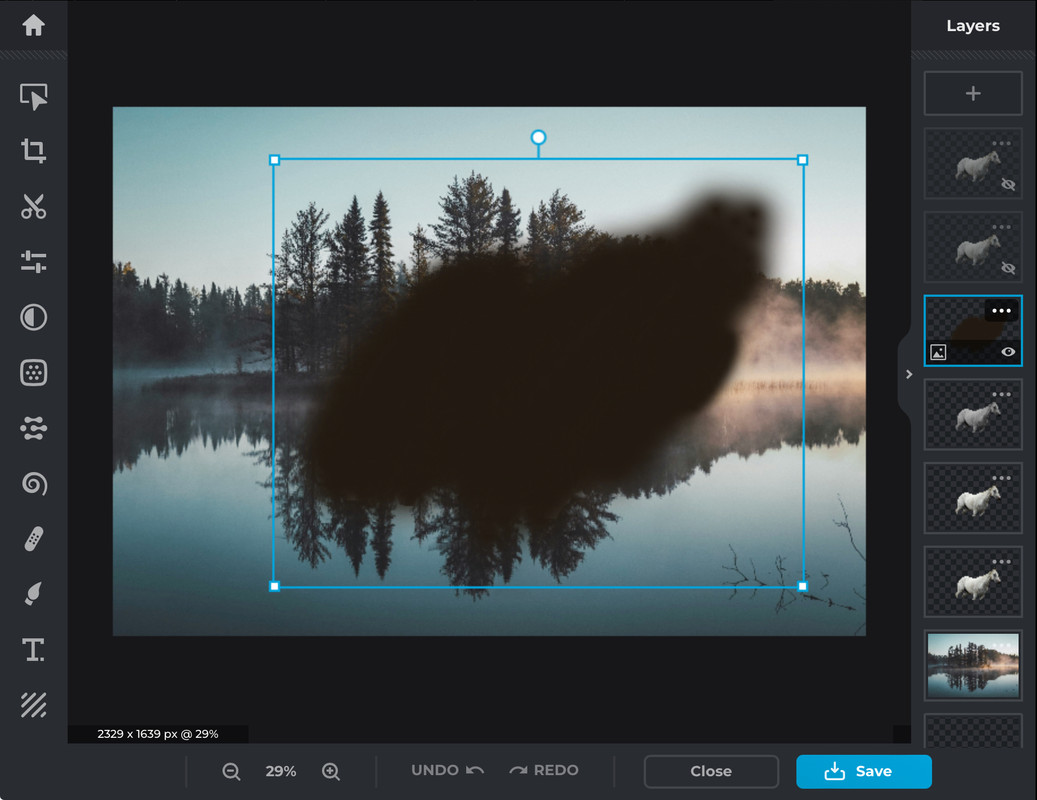
Hello! I believe I can help with this! This is how I do it
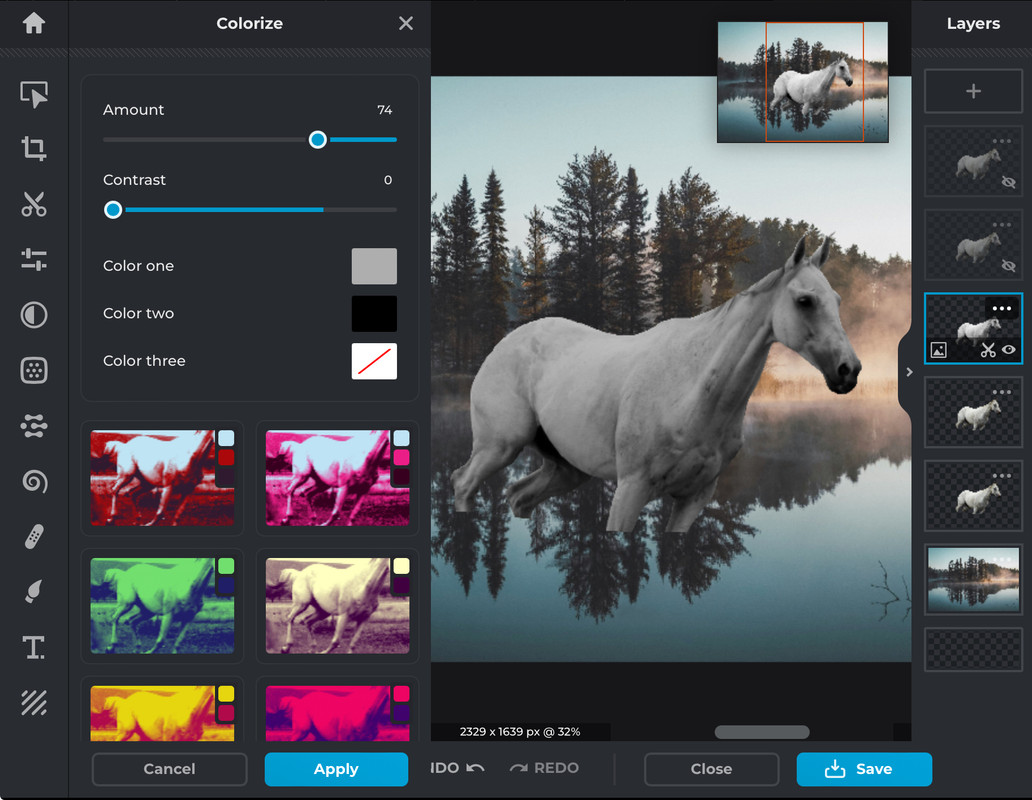
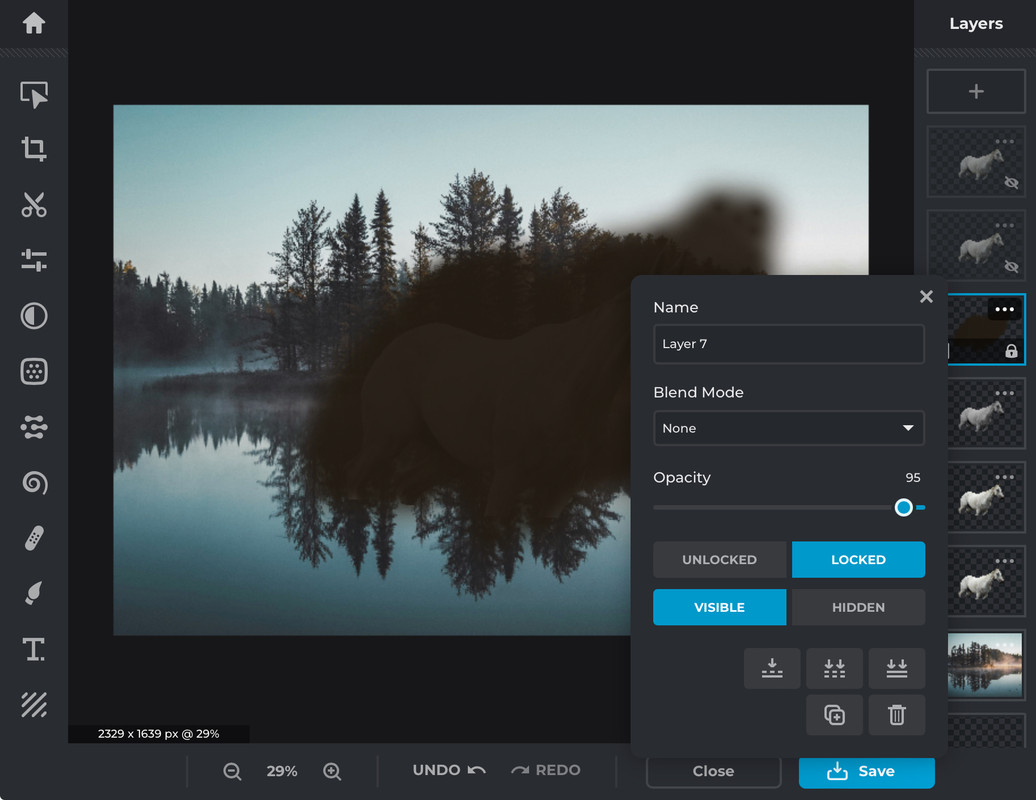
So I tend to double a couple of the horse layers as you can see off to the right, I usually pick around the third horse layer and colour it as a greyscale, I prefer to see everything I am doing so making the top horse layers invisible helps.
Then add a plain layer on top of the greyscale horse layer, and jump into Pixlr E, and equip the painting tool
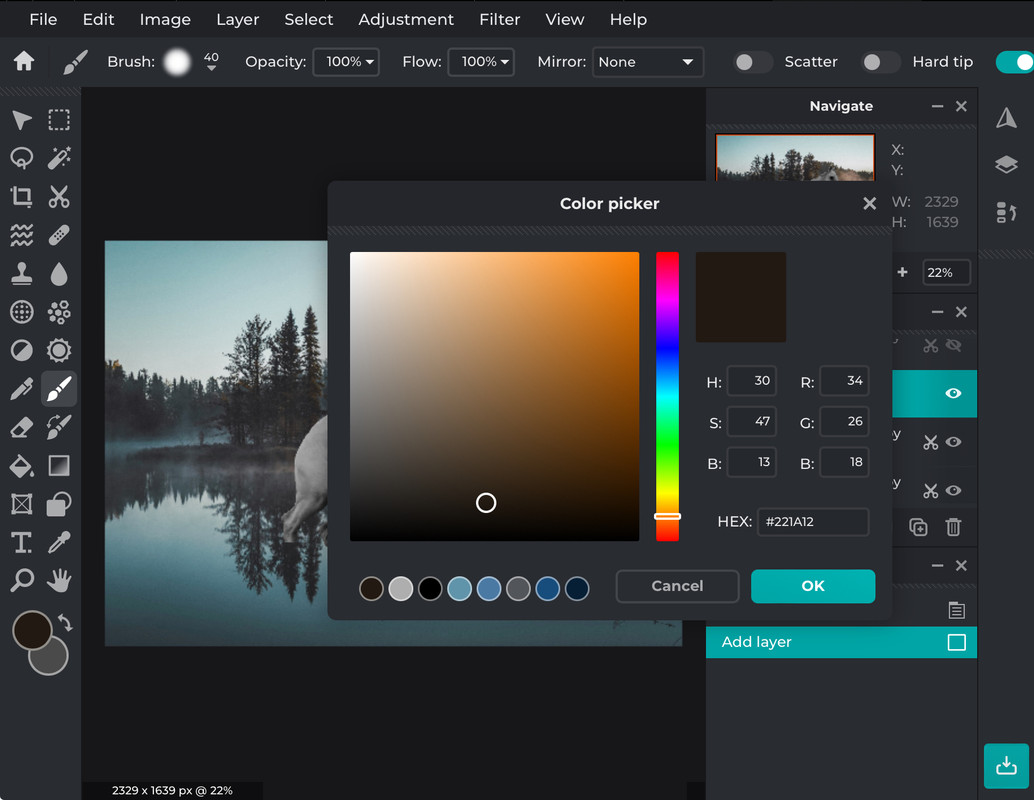
I normally set the brush to about 230-370px and 100% opacity and colour the horse, don't be afraid to be messy 😁
Then I slip back into Pixlr X and lower the opacity to the coloured layer until your happy
I then make the horse layer on top of the coloured layer visible, then turn its opacity down, making the horse look a little less fuzzy.
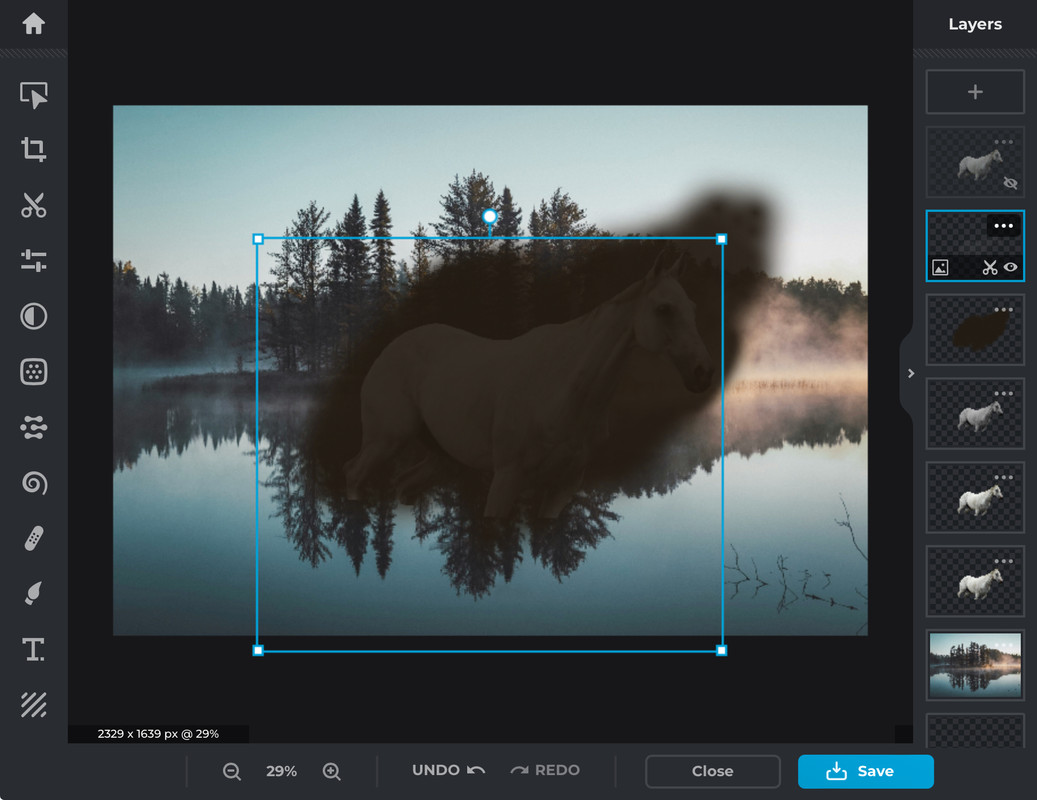
Once you have erased the unneeded colour, make the top horse layer visible, I prefer to use the scissors to make markings, but some times I use the painting brush in Pixlr E, alright, now I remove the top layer with the scissors lasso, then change it to keep instead of remove, still Scissors lasso, and create markings using the scissors
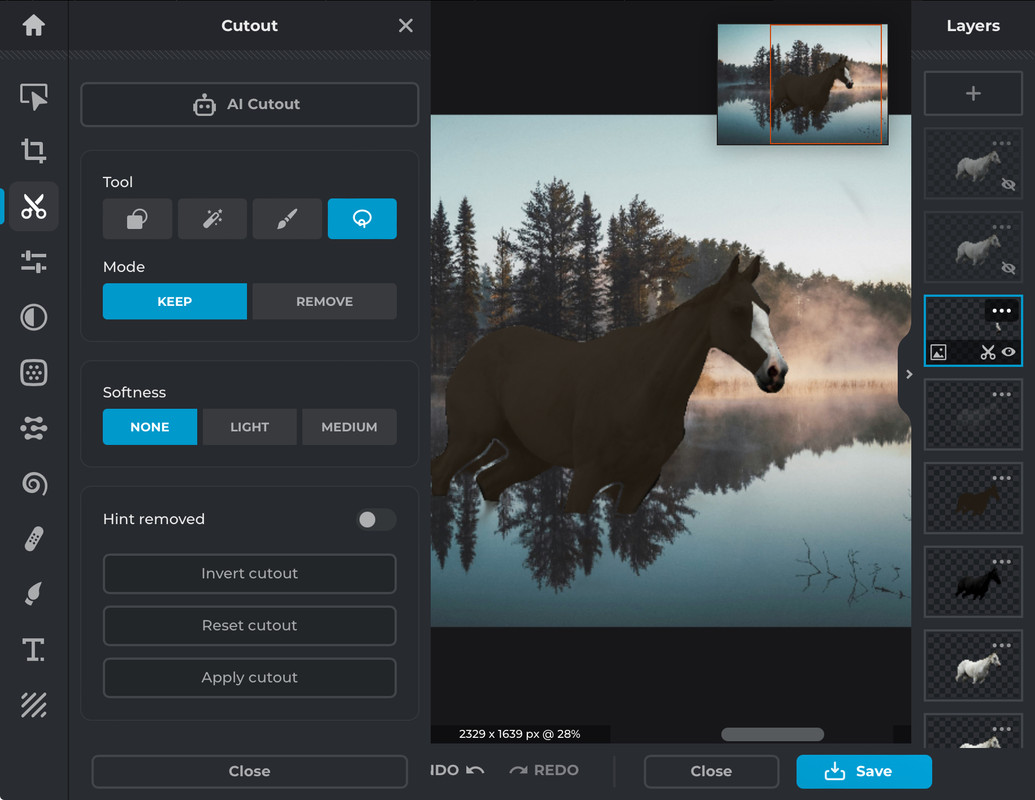
I hope this helps you!
Re-coloring help! February 18, 2024 05:57 PM


Sundance
 
Posts: 204
#1180759
Give Award

Ponies heaven said:
Hello! I believe I can help with this! This is how I do it

So I tend to double a couple of the horse layers as you can see off to the right, I usually pick around the third horse layer and colour it as a greyscale, I prefer to see everything I am doing so making the top horse layers invisible helps.
Then add a plain layer on top of the greyscale horse layer, and jump into Pixlr E, and equip the painting tool

I normally set the brush to about 230-370px and 100% opacity and colour the horse, don't be afraid to be messy 😁
Then I slip back into Pixlr X and lower the opacity to the coloured layer until your happy
I then make the horse layer on top of the coloured layer visible, then turn its opacity down, making the horse look a little less fuzzy.

Once you have erased the unneeded colour, make the top horse layer visible, I prefer to use the scissors to make markings, but some times I use the painting brush in Pixlr E, alright, now I remove the top layer with the scissors lasso, then change it to keep instead of remove, still Scissors lasso, and create markings using the scissors

I hope this helps you!


Yes, it does. Thank You!!

Edited at February 18, 2024 05:58 PM by Sundance

Forums > Art Shops > Art Help
   1 

Refresh